
Load geodata. Keep modeling.
GeoBridge integrates DGM, DOP, CityGML and Shapefile directly in Revit. No preprocessing, no cloud.
GeoBridge is a suite of four Revit plugins that bring official geodata straight into your BIM model. Four plugins, one consistent workflow: DGM, DOP, CityGML, GeoShape. No preprocessing, no conversion detour, no cloud processing of your data. GeoShape reads GeoJSON, Shapefile, KML/KMZ, CSV and GeoPackage — and exports your detail geometry back into those formats too (Pro).
Four geo formats, straight into Revit.
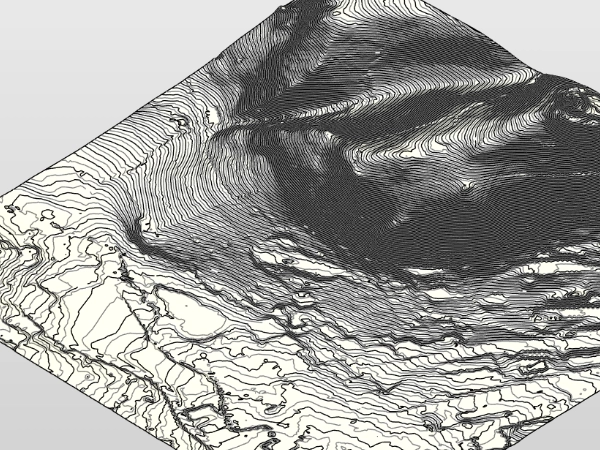
DGM
Digital terrain model. Elevation grid for terrain modeling.
DGM
Digital terrain model. Elevation grid for terrain modeling.
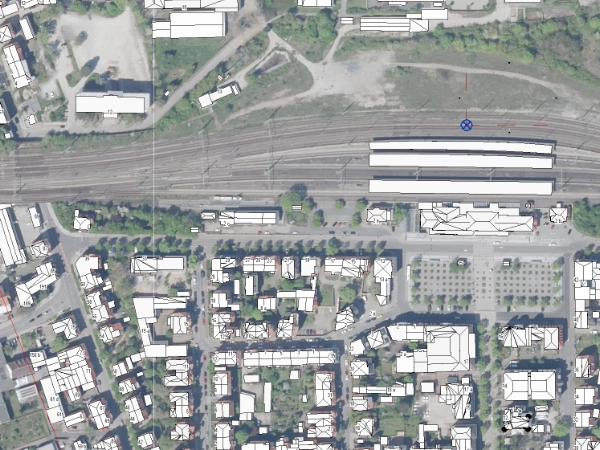
DOP
Digital orthophoto. Georeferenced aerial imagery.
DOP
Digital orthophoto. Georeferenced aerial imagery.
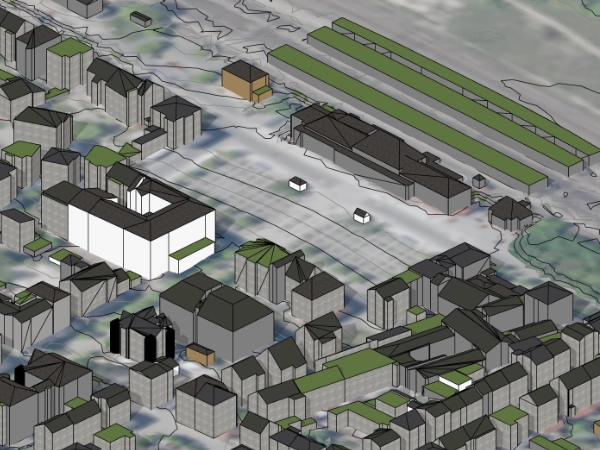
CityGML
3D city models per OGC standard. Buildings in LoD1 / LoD2.
CityGML
3D city models per OGC standard. Buildings in LoD1 / LoD2.
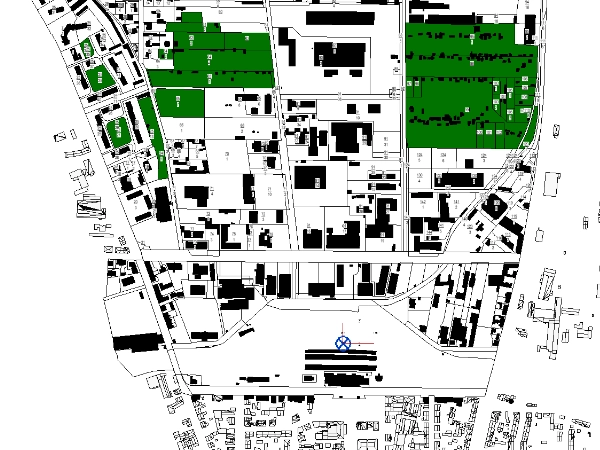
Shapefile
Vector geodata (GeoJSON, Shapefile, KML, CSV, GeoPackage). Parcels, cadastre, ALKIS — import and export (Pro).
Shapefile
Vector geodata (GeoJSON, Shapefile, KML, CSV, GeoPackage). Parcels, cadastre, ALKIS — import and export (Pro).
More than just import.
Consistent georeferencing, robust data validation, collaboration-ready.
What works together.
What you need.
| Revit | 2025 · 2026 · 2027 |
| OS | Windows 10 64-Bit · Windows 11 |
| .NET | .NET Framework 4.8 (Revit-Voraussetzung) |
| RAM | Empfohlen 16 GB · 32 GB für DGM1-Großtiles |
| Plugin-Größe | ~50 MB pro Plugin |
| Internet | Nur für Lizenz-Check via Autodesk App Manager |
| Lokale Settings | %APPDATA%\LichtBus\GeoBridge\settings.json |
Four steps from geoportal into the model.
Download example data.
A complete Weimar sample from the geoportal: CityGML LoD2, DGM1 tiles and DOP orthophotos. Download it and test the full import workflow with real official data — no need to source data yourself.
Download example dataZIP · ~320 MB · CityGML + DGM1 + DOP (Weimar)
The sample data comes from the open geodata of Geoportal Thüringen (Thuringian State Office for Land Management and Geoinformation) — unmodified original tiles, merely selected and packed. Attribution: © GDI-Th. Licence: Datenlizenz Deutschland – Namensnennung – Version 2.0 (dl-de/by-2-0). If you reuse or pass on the data, you must carry this attribution with it.
Right on the workstation. No cloud.
All geodata is processed locally inside your Revit. GeoBridge sends no geospatial or project data to LichtBus or third parties, no telemetry. The Free edition contains no network code and sends nothing. The Pro edition runs a one-time entitlement check with Autodesk at startup — only your Autodesk user ID and the app ID are transmitted to Autodesk, nothing to LichtBus.
The lichtbus.de platform only processes what you actively send (tickets, requests). Plugin and platform are separate.
In nine languages.
DE and EN fully translated. Seven additional languages experimental (GPT-4-translated, Strategy C — ribbon, About dialog and critical errors in the respective language, remaining UI strings partly in EN). Full translations follow step by step.
Free or Pro.
Free delivers the full single-file workflow for all four plugins. Pro adds multi-file imports, cross-tile edge merge, style mapping, GeoShape export and more.
| Feature | Free | Pro |
|---|---|---|
| DOP — orthophoto import | ✓ | ✓ |
| DGM — terrain import (GeoTIFF) | ✓ | ✓ |
| DGM — XYZ point list | — | ✓ |
| CityGML — city model import (LoD1, LoD2) | ✓ | ✓ |
| GeoShape — vector import (GeoJSON, Shapefile, KML/KMZ, CSV) | ✓ | ✓ |
| GeoShape — GeoPackage import (.gpkg) | — | ✓ |
| Set / adopt survey point | ✓ | ✓ |
| Anchor modes (standard, reference point, auto-reuse) | ✓ | ✓ |
| UTM convention selection | —fest auf ohne Präfix | ✓ |
| CRS reprojection for differing source CRS | — | ✓ |
| Polygon filter — multi-select up to 4 lines | ✓ | ✓ |
| Polygon filter — advanced (>4 lines, GeoJSON, lines) | — | ✓ |
| DGM processing (smoothing + resolution) | —fest auf „Leicht + Standard" | ✓ |
| Material mapping per class (CityGML) | ✓ | ✓ |
| Material mapping per function / per storey | — | ✓ |
| Change materials post-import (CityGML) | — | ✓ |
| Material on individual faces / override (CityGML) | — | ✓ |
| CityGML LoD3 + LoD4 | — | Auf Anfrageprojektbezogene Anpassung |
| AdV metadata as shared parameters | ✓ | ✓ |
| Multilingual UI (9 languages) | ✓ | ✓ |
| Re-import detection | ✓ | ✓ |
| Drift detection (survey point + angle) | — | ✓ |
| Multi-tile import (multi-file select) | — | ✓ |
| DGM edge-merge at tile boundaries | — | ✓ |
| DOP as material on DGM toposolid (incl. texture resolution) | — | ✓weltkoordinaten-aligned UV |
| Remove DOP texture / repair DOP material | — | ✓ |
| HK addresses as family instances (GeoShape) | — | ✓ |
| GeoShape export (GeoJSON/KML/Shapefile/GeoPackage) | — | ✓ |
| GeoPackage multi-layer picker (GeoShape) | — | ✓ |
Both editions ship in parallel through the Autodesk App Store. Upgrade any time.
Dataset won't load? Send it over.
I build GeoBridge myself — your request reaches me directly, not a queue. Attach the dataset to the ticket: the upload takes DGM, DOP, CityGML and Shapefile as they are. Usually it is a format quirk I can build in. Same for missing regions, bugs and feature requests.
No password needed. You get a login link by email — your address is the key.
Want to look it up first? Quick help and troubleshooting
FAQ.
srsName, Shapefile .prj sidecar. Supported: UTM-32N, UTM-33N, ETRS89-LAEA, Gauss-Krüger zones 2-5, WGS84. Re-projection to the project CRS optional.Question not covered? Open a support ticket · Detail docs · Quick help